For teams leaving ClickUp
Leaving ClickUp? Keep every task, Doc, comment and file.
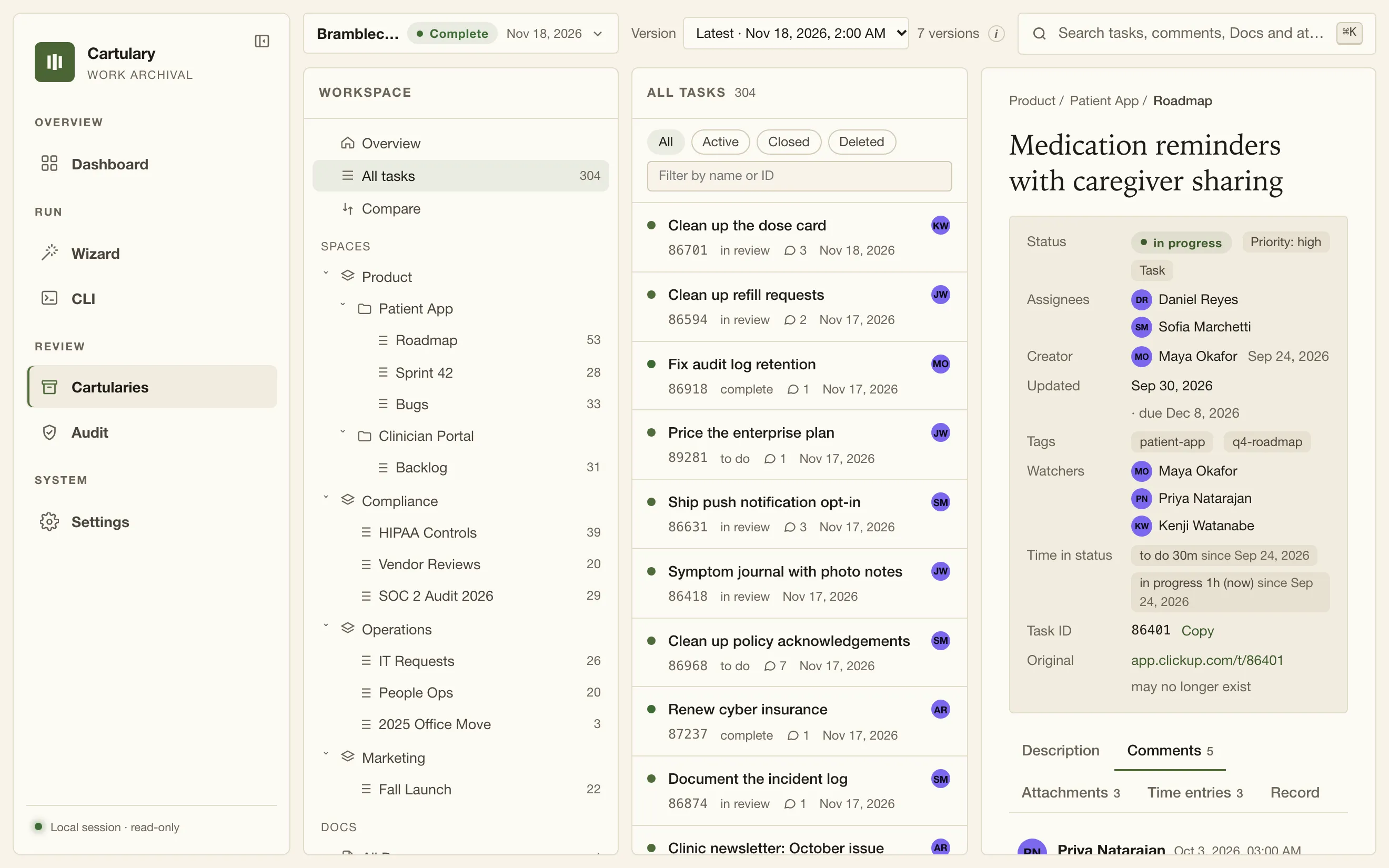
Cartulary copies your whole Workspace to your own computer before you cancel: tasks with their custom fields, every comment and threaded reply, Docs, Chat and the attachment files. It’s sealed, searchable offline, and readable without us.
Free inventory and test run · macOS and Windows · Read-only · 30-day refund
- Every file sealed. Check it with
sha256sum -c. Change one byte and the check names the file. - Read-only by construction. Its network code can only send GET requests to ClickUp.
- Gaps named. Each archive is rated for completeness, with the reasons listed.
The same discussion, two ways.
ClickUp’s Workspace export does include comments. All of a task’s comments go into one spreadsheet cell as raw JSON, flat, and the files appear only as links. Cartulary keeps each comment, its replies and its files.
[{"text":"Signed copy is in the shared drive. Closing this out.\n","by":"maya.okafor@example.com","assigned":false,"date":"3/14/2026, 9:12:05 AM EDT","resolved":"N/A"},{"text":"@Dev Patel can you confirm the vendor accepted the revised terms?\n","by":"sam.lindqvist@example.com","assigned":false,"date":"3/11/2026, 4:40:51 PM EDT","resolved":"N/A"},{"text":"Uploaded the draft agreement for review.\n","by":"dev.patel@example.com","assigned":false,"date":"3/10/2026, 11:02:17 AM EDT","resolved":"N/A"}]Cartulary · the same kind of task, archived
More on ClickUp’s own export: what it includes, and what it leaves out.
What it keeps.
- Spaces, Folders and Lists, with their statuses, views and Custom Field definitions
- Open, closed and archived tasks and subtasks, with custom fields, checklists, dependencies and time in status
- Every page of comments and every threaded reply, List comments too
- Docs and their pages, including archived Docs
- Chat channels and DMs the connected account can see: messages, replies and reactions
- Time entries, Goals and task templates
- The actual files: on tasks, in comments, and pasted into descriptions and Docs, downloaded and hashed
- Members, guests and groups, and the original API responses, credentials removed
What it leaves out.
- Whiteboards, Dashboards, Form definitions, Automations and Reminders (not in ClickUp’s API; Form submissions are tasks, and are kept)
- Task activity history and comments on Doc pages (no API; time in status is kept instead)
- Whom a single task is shared with directly
- Restoring into ClickUp: Cartulary only reads from it
Export your Whiteboards and Dashboard cards from ClickUp before you cancel; the guide lists what to save by hand.
Four steps, and the first three are free.
- Install the appCartulary runs on your Mac or Windows PC. Your archive is written there and nowhere else.
- Connect your WorkspacePaste a ClickUp API token. It is kept in your operating system’s credential store and sent only to ClickUp.
- Take the free inventory and test runSee what an export would hold and how big it is, then read the whole Workspace and get a completeness report. No license needed.
- Keep itHappy with the test? Buy a license and export. Every version is sealed, searchable offline and yours to keep.
Moving to Linear?
Linear has no ClickUp importer. Cartulary writes your tasks as a CSV in the shape Linear’s importer reads, with an ID map that links each Linear issue back to the archive. Bring the live work across; the archive keeps the full history, comments and files. Included in every plan.
How the Linear CSV worksBefore you decide.
- Is it safe to give Cartulary my ClickUp token?
- Cartulary’s network code can only send GET requests, so it reads and never writes. The token is kept in Keychain on macOS or Credential Manager on Windows, never written to a file, an archive or a log, and sent only to ClickUp. The token itself carries your account’s permissions, so protect it like the account. How Cartulary handles your token
- How do I know the archive is complete?
- Each archive is rated Complete, Complete with warnings, Partial or Failed, and the reasons are listed: anything the account was refused, or a file that failed to download. The free test run shows you the same report before you buy. How verification works
- Can I restore the archive into ClickUp, or into another tool?
- No. Cartulary only reads from ClickUp. The archive is plain JSON, Markdown, CSV and SQLite, so you can open it with standard tools, and it can write a CSV for Linear’s importer. The archive format
- What if it isn’t right for us?
- Every license has a 30-day refund, for any reason. Email us and you get your money back. Refund policy
Keep the record before you cancel.
Cartulary is an independent project, not affiliated with, endorsed by, or sponsored by ClickUp, Mango Technologies, Inc., Atlassian or Linear. Those names identify the services whose data Cartulary reads.